Aerial view of an industrial estate overlaid with a three-metre grid, illustrating how what3words helps contractors locate precise entrances, parking areas and equipment on large sites.

How Geolocation Makes Contracting Easier with TeamPoint

23.11.26inJob Management Software
Written by
Portrait of a TeamPoint blog author for the Knowledge Centre.
Rosie Cottell
HOME/KNOWLEDGE CENTRE/how-geolocation-makes-contracting-easier-with-teampoint
Job Management Software23.11.26

How Geolocation Makes Contracting Easier with TeamPoint

How TeamPoint combines Google Maps, GPS data and what3words to plan more sensible schedules, record where work took place and help operatives find the right entrance, parking spot or piece of equipment.

Finding an address is usually straightforward. Finding the right entrance, the right parking spot or a particular piece of equipment on a sprawling industrial site can be more difficult – and, over multiple site visits, can waste a lot of time.

For businesses managing people and jobs across multiple locations, knowing where everyone needs to be, how long it will take them to get there and what's happening on site can make an enormous difference to the working day.

Geolocation is the technology used to identify a geographical position, typically through GPS, mobile devices or mapping services. It has become a valuable part of modern job management, helping businesses plan more intelligently, cut down on unnecessary journeys and maintain accurate records of completed work.

TeamPoint puts this information to practical use, combining Google Maps, GPS data and, most recently, what3words to help everyone get where they need to be, with far less wasted time.

Smarter scheduling with Google Maps

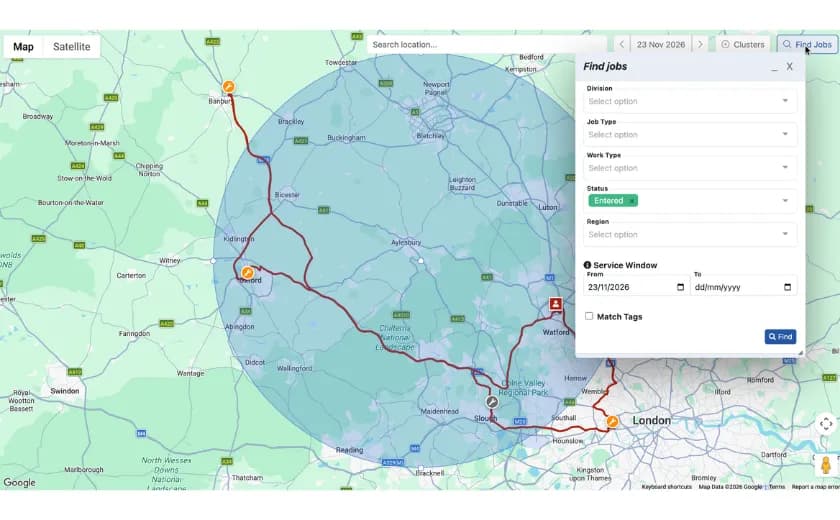
When you're organising engineers and operatives across several locations, geography matters just as much as availability. TeamPoint's scheduling tools use Google Maps to display jobs and operative locations, giving schedulers a clearer picture of who is best placed to attend a particular site.

Estimated travel times help make appointments more realistic. After all, there's little sense in sending someone across the county when another operative is already working a few streets away. For urgent, reactive jobs, the map helps identify the nearest suitable person, while the ability to search for other jobs within a chosen distance makes it easier to group visits geographically rather than sending operatives back and forth across the same territory.

Daily map showing use of geolocation in Teampoint
Google Maps

For businesses juggling larger volumes of planned work, TeamPoint's optional Batch Scheduling tool takes geography into account alongside working hours, existing commitments and operative skills when proposing a schedule.

The aim is to make better use of the working day: less time travelling, fewer unnecessary miles and more time spent doing the work.

You can explore these tools in more detail in From Planning to Dispatch: Scheduling in TeamPoint.

Seeing where work is happening

Once the schedule is underway, location information serves another purpose: showing what's happening on the ground and providing a record that can be revisited later.

TeamPoint's Daily Map provides a geographical view of operational activity, including the ability to select previous dates and look back at what happened on a particular day. Managers can explore individual operatives' activity and search for jobs within a geographical area, using filters such as job type, status and service window.

This can be particularly revealing when investigating a customer's query, reviewing a hectic day's work or establishing who attended a particular site.

There's also a difference between knowing a job was marked complete and having evidence of where and when the work took place. TeamPoint records GPS coordinates when an operative starts and finishes a job, while photographs can also be watermarked with GPS coordinates when required.

For businesses responsible for work across numerous sites, having this information connected to the job record can save a lot of detective work later. It's part of TeamPoint's wider Mobile Working functionality, which allows operatives to record photographs, forms, signatures and job updates while on site.

Finding the right place with what3words

Sometimes knowing the right postcode isn't enough.

An industrial estate might have half a dozen entrances. A hospital or commercial complex could have a separate contractors' gate, while the equipment you've come to service is tucked away somewhere behind the main building.

This is where what3words comes into its own.

Finding the right place with what3words
what3words

The idea has an interesting origin. In 2013, Chris Sheldrick, who worked in the music industry, co-founded what3words after repeatedly encountering the frustrations of directing bands, equipment and deliveries to the right entrances at large venues.

The solution was ingenious in its simplicity: divide the entire world into squares measuring just three metres by three metres and give every square its own unique combination of three words. It turns a potentially awkward set of coordinates into something much easier to communicate.

The addition of what3words to TeamPoint came about following a request from customer Aqua Mundus, whose work can involve locating particular access points and equipment across extensive sites.

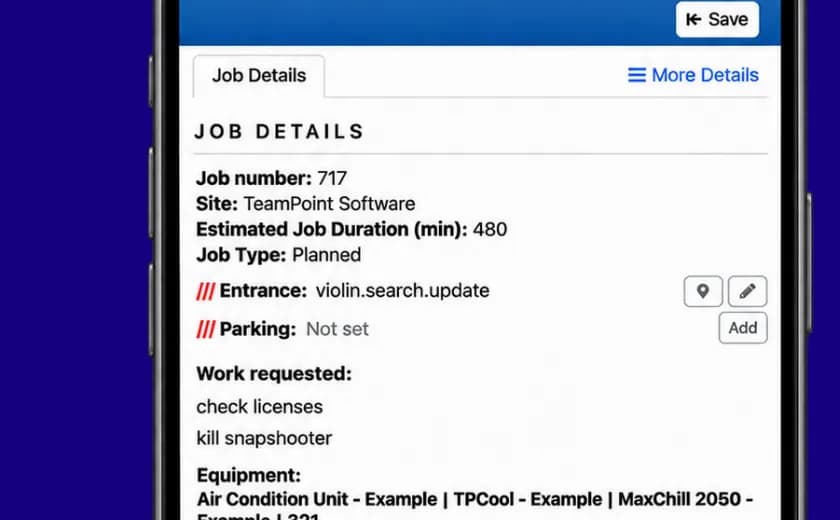
Within TeamPoint, what3words addresses can be recorded against site entrances, parking locations and individual pieces of equipment. Operatives can tap the three-word address in the mobile app to open the corresponding location on the what3words website.

Better still, they can add or correct these locations while they're actually on site. Once the job is submitted, the updated information is saved against the site or equipment record, ready for the next visit.

This also complements TeamPoint's wider Asset & Equipment Management functionality, which keeps equipment details, service histories and supporting information connected to the relevant sites and jobs.

It's a modest change with a very practical benefit. The operative who eventually discovers that the entrance is around the back, beyond the second security gate, can make sure the next person doesn't have to rediscover it.

Travel time, fleet management and the wider picture

Location information also has a part to play in understanding how efficiently a business operates.

TeamPoint uses Google Maps to estimate journey times, which can then be compared with actual travel time recorded through operatives' timesheets. Over time, those comparisons can reveal where travelling is eating into productive hours, helping managers make more informed decisions about scheduling and the areas their teams cover.

For businesses needing a more detailed picture of their vehicles, TeamPoint also integrates with major fleet and van-tracking systems, including Verilocation and Quartix.

Specialist fleet-management systems offer additional information such as vehicle movements, journey histories, mileage and driving behaviour. Working alongside TeamPoint, they complement the operational information held within the job management system.

TeamPoint isn't trying to replace a dedicated fleet-management platform. Its role is to bring geographical information into the everyday business of planning, carrying out and reviewing work, where that information can make a tangible difference.

Making every journey count

The real value of geolocation isn't necessarily in knowing where someone is every minute of the day. It's in having the right information at the moment you need it.

Whether that's finding the nearest available operative, planning a more sensible sequence of appointments, checking where work was completed or directing someone to a well-hidden piece of equipment, TeamPoint brings location information into the wider job management process.

And when the difference between a straightforward visit and twenty minutes spent wandering around an unfamiliar site comes down to a few metres, knowing precisely where you're going is a huge advantage.


You may also like

Abstract map-based scheduling illustration showing connected routes, location points and planning paths in TeamPoint brand colours.
Platform Capabilities
Written byRosie Cottell

From Planning to Dispatch: Scheduling in TeamPoint

TeamPoint helps service businesses plan, allocate and adapt work using connected calendar, map and mobile scheduling tools. From planned maintenance and reactive jobs to skills, availability, travel time and reporting, scheduling stays connected to the wider job information so teams can make better decisions as the day changes.

11.09.26
Read More
Abstract illustration representing TeamPoint mobile working, with connected routes, job updates and information flowing between operatives on site and the office.
Platform Capabilities
Written byRosie Cottell

Working on site with the TeamPoint mobile app

A practical look at how the TeamPoint mobile app supports engineers and operatives on site, from accessing job information and completing forms to capturing evidence, updating assets and flagging further work. It also shows how information recorded on site feeds back into the wider TeamPoint job record, giving managers better visibility, consistency and information for follow-up, compliance, reporting and invoicing.

20.09.26
Read More
Interlocking shapes forming a unified picture, representing how business data comes together to reveal performance and trends.
Platform Capabilities
Written byRosie Cottell

Business performance reporting in TeamPoint: turning everyday data into better decisions

This guide explores TeamPoint's business performance reporting for service and maintenance companies, from sales conversion and customer trends to job profitability, operational efficiency and long-term growth.

17.11.26
Read More
Electronic access fobs and keys used for facilities management
Industry Knowledge
Written byRosie Cottell

How FM Businesses Balance PPM & Reactive Maintenance & Make Better Use of Engineer Time

This article explores how facilities management businesses can balance planned and reactive maintenance more effectively by using operational data, connected workflows and better scheduling. It looks at how job management software can help teams prioritise urgent work, support engineers in the field, identify recurring asset issues, improve first-time fix rates and use reporting to make better use of maintenance resources.

19.09.2026
Read More