TeamPoint connects jobs, invoicing and payments in one system, reducing administration and keeping finances organised.

From Completed Work to Getting Paid: Invoicing & Payments in TeamPoint

02.11.26inPlatform Capabilities
Written by
Portrait of a TeamPoint blog author for the Knowledge Centre.
Rosie Cottell
HOME/KNOWLEDGE CENTRE/from-completed-work-to-getting-paid-invoicing-payments-in-teampoint
Platform Capabilities02.11.26

From Completed Work to Getting Paid: Invoicing & Payments in TeamPoint

TeamPoint connects invoicing directly to the jobs, projects and service contracts behind it. From checking completed work and batch invoicing to deposits, stage payments, retentions, recurring contracts, online payments and accounting integrations, the information needed to bill accurately is available in one place, helping the office invoice sooner, avoid missed charges and keep track of money still to come.

In any contracting business, efficient invoicing keeps the work moving. The sooner completed work is invoiced correctly, the sooner the business can be paid. But the more jobs, customers and contracts there are to manage, the harder that becomes.

A completed job can stall for many reasons: a missing worksheet, unchecked materials, extra work that hasn't been added, or a purchase order number the accounts team is still chasing. Add deposits, stage payments and retentions that won't fall due for months, and money stays tied up for longer than it should.

Below, we walk through the invoicing and payments capabilities in TeamPoint job management software, from checking completed jobs to getting paid, with practical examples from different contracting sectors.

From quotation to invoice: keeping the information connected

Imagine you work in the office of a building maintenance company, an air conditioning contractor or a firm cleaning the windows of high-rise office blocks. Whatever the business, you're some distance from the work itself, but you're responsible for making sure it's invoiced accurately.

Ideally, you want a reliable record of everything that affects the financial side of each job, a clear indication of when it's ready to invoice and quick access to the supporting information. When those details are scattered across spreadsheets, emails and handwritten notes, pulling them together takes time and invites mistakes.

In TeamPoint, details from an accepted quotation can carry through to the job, including the agreed work and pricing. Customer purchase order numbers and billing requirements can be recorded against it, while operatives use the TeamPoint mobile app to add labour, materials, photographs, worksheets, certificates and signatures as work progresses.

Of course, things don't always go to plan. Extra materials may be needed, an unexpected problem may be found or the customer may ask for work outside the original quotation. Recording these changes against the job means the office has what it needs to account for them when preparing the invoice.

Before raising an invoice, staff can review the completed work, check pricing and supporting documents, and amend labour, materials, descriptions or additional charges where needed. Businesses can also configure checks that stop a job progressing until a requirement is met, such as a supervisor reviewing a completed worksheet or photographic evidence.

Once everything is in order, the job moves to Ready to Invoice.

For more on how the original quotation connects with the work that follows, see From Quote to Invoice: How TeamPoint Keeps the Commercial Process Connected.

Example: drainage work at a commercial kitchen

A drainage contractor attends a commercial kitchen to clear a blocked drain. During the visit, the engineer finds damaged pipework that needs repairing. The extra labour and materials are recorded against the job, along with photographs and a completed worksheet.

Back in the office, the manager can compare the original scope with the work actually carried out, check the customer's purchase order number and make sure the additional charges are included before invoicing.

For a busy drainage company, this is about more than saving administration time. It's about making sure work that has been done is actually charged for. Across hundreds of jobs, even small omissions can add up to a considerable sum.

Job invoicing, batch invoicing and consolidated billing

Different customers often have very different expectations about how and when they're invoiced. For some, an individual invoice for each completed job is exactly right. Others expect a single invoice covering all the work carried out across several sites during the month.

Batch invoicing for higher volumes of work

For businesses completing dozens or hundreds of jobs, raising each invoice one at a time becomes a considerable task. TeamPoint's batch invoicing lets the office process large volumes of completed work together.

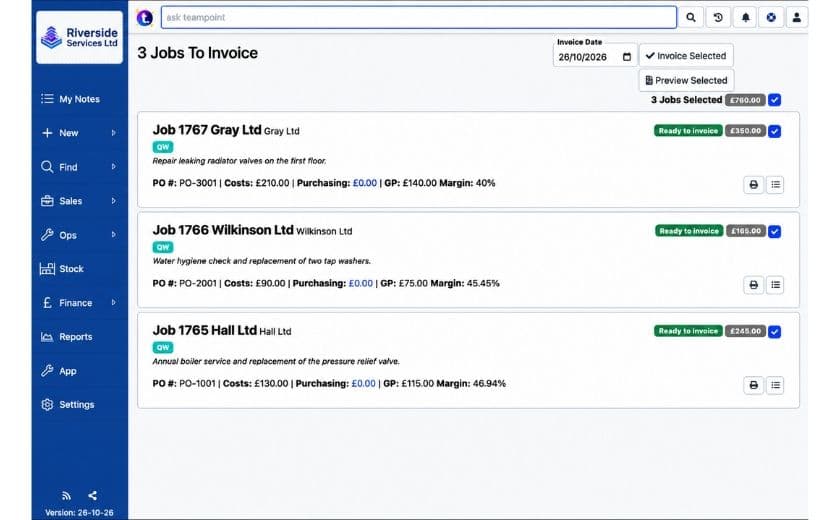
The Jobs to Invoice screen shows the jobs ready to bill, with customer, site, value and purchase order details. Staff choose which jobs to include, hold back any that need more attention and preview the invoices before committing to the run. Once invoiced, jobs move to Closed, Invoiced, so they can't be picked up again in a normal invoice run.

Each customer's invoicing preferences determine whether the selected jobs produce individual invoices or are grouped together. The office can process work quickly without losing control of what's being charged.

TeamPoint’s Jobs to Invoice screen showing three completed jobs ready for batch invoicing, with job costs, profit margins and invoice amounts.
Jobs to Invoice

Consolidated invoices for multiple jobs and sites

For contractors working across several properties or managing ongoing maintenance contracts, consolidated invoicing can make life easier for both the business and its customers.

Take a facilities management contractor maintaining thirty commercial properties for one customer. Through the month, engineers carry out planned inspections, attend reactive callouts and complete additional repairs. Each visit has its own job record, but the customer doesn't want a separate invoice every time an engineer attends.

With TeamPoint, multiple jobs can be combined onto one consolidated invoice, even when the work took place at different sites. Each job remains identifiable, with its site, job details and relevant purchase order references. The customer's accounts department processes one invoice instead of dozens, while retaining the information it needs to check the charges.

TeamPoint consolidates jobs across multiple sites into one invoice, reducing administration.
Consolidated Invoicing

TeamPoint can also combine completed jobs with prepaid service contract charges on the same consolidated invoice, which suits customers with a mix of planned maintenance and additional work.

Not every customer wants to be billed this way. Some prefer an invoice per job, while others have particular requirements around billing dates, purchase orders or VAT. Consolidated invoicing also has to account for the VAT treatment of different jobs and any amounts already invoiced, so the appropriate arrangement is established for each customer.

This is particularly useful for businesses involved in facilities management and property services, where one customer may be responsible for dozens or even hundreds of sites.

Invoicing that meets your customers' requirements

Anyone who works with larger commercial customers knows that getting an invoice accepted takes more than getting the amount right.

Some customers insist on their own purchase order reference. Others require signed worksheets, photographs, certificates or specific information on the invoice itself. One accounts department wants everything emailed to a central address; another expects invoices to go to individual sites.

An otherwise correct invoice can be rejected because a reference is missing or a document wasn't attached, which means another round of emails, corrections and waiting for approval.

Invoicing that meets your customers' requirements

TeamPoint lets businesses configure invoicing arrangements for each customer, including invoice layouts, payment terms, billing methods, VAT treatment, delivery preferences and supporting documents.

Customer-specific pricing arrangements can also be managed in TeamPoint, so agreed rates and charges are reflected in the work being quoted and invoiced.

Purchase orders and supporting documents

For customers who require a purchase order number before work can go ahead, TeamPoint can flag jobs where the number is missing and prevent dispatch until it has been entered. This is particularly useful when working for national contractors or facilities management clients with strict purchasing procedures.

Supporting documents work the same way. If a customer requires a signed worksheet and inspection certificate with every invoice, those records are already held against the job, so they can be included as part of the configured process without anyone retrieving them from another system.

Delivery and onboarding

Invoices can be emailed, printed or made available through the Customer Portal. Different recipients, including site-specific contacts or multiple email addresses, can be configured according to the customer's requirements.

These arrangements are established during onboarding, when the TeamPoint team works with each business to understand its existing processes. Where something more specialist is needed, additional configuration or development can be considered.

This flexibility is especially valuable for contractors working across several industries or supplying customers with different procurement and accounts procedures.

Deposits, stage payments and project invoicing

Some jobs can be invoiced in full once the work is finished. Others involve substantial costs before anyone arrives on site, with payments agreed at different stages.

TeamPoint supports both.

Taking deposits before work begins

For jobs involving expensive equipment or specialist materials, taking a deposit up front makes good financial sense.

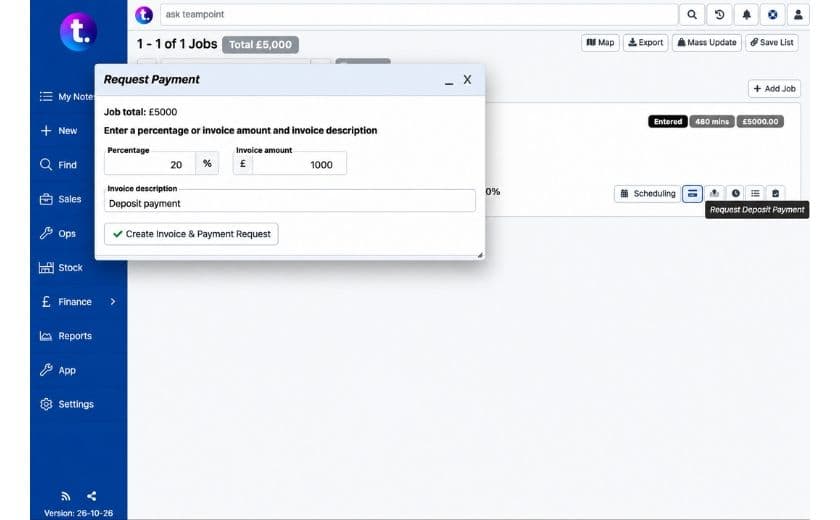
TeamPoint lets businesses request a deposit for a fixed amount or a percentage of the job value. A deposit invoice is created and linked to the job, with the outstanding payment recorded against it.

The job can still be scheduled, but TeamPoint can prevent it being dispatched until the deposit has been paid. The office can plan the work without sending an operative before the agreed payment arrives. Once the payment is recorded, the restriction is cleared and the job can go ahead.

TeamPoint’s deposit payment screen showing a 20% deposit request before work begins.
Deposit request

When the final invoice is raised, the deposit is taken into account, including its VAT treatment, so the customer is charged only the remaining balance.

For businesses that regularly order equipment or materials in advance, this provides a consistent way to manage deposits without separate spreadsheets or someone remembering to check the bank account first.

Managing payments through a project

Larger projects often involve several stages of work, different suppliers and subcontractors, and payments spread across the contract. Knowing what has been spent, what has been invoiced and what is still outstanding is essential to managing the project's finances.

Take a commercial roofing contractor carrying out a £120,000 refurbishment. The customer has agreed to an initial payment, a further payment part-way through and a final payment on completion. Meanwhile, the contractor is paying for scaffolding, materials, labour and subcontractors.

In TeamPoint, these arrangements are managed as part of the project itself. Contractors can raise invoices at agreed stages, invoice individual jobs as they're completed or bill the entire project at the end. Every invoice stays connected to the project, alongside its jobs and purchasing records.

Stage invoice amounts are entered by the user rather than calculated automatically from a milestone schedule, so the contractor raises the agreed amounts at the appropriate points.

Projects don't always unfold as expected. Suppose more repairs are needed once the old roof covering is removed. The contractor raises a variation quotation within the project, so the customer can approve the extra cost before the work goes ahead. Once accepted, the variation increases the agreed project value and can be invoiced through the project's billing arrangements.

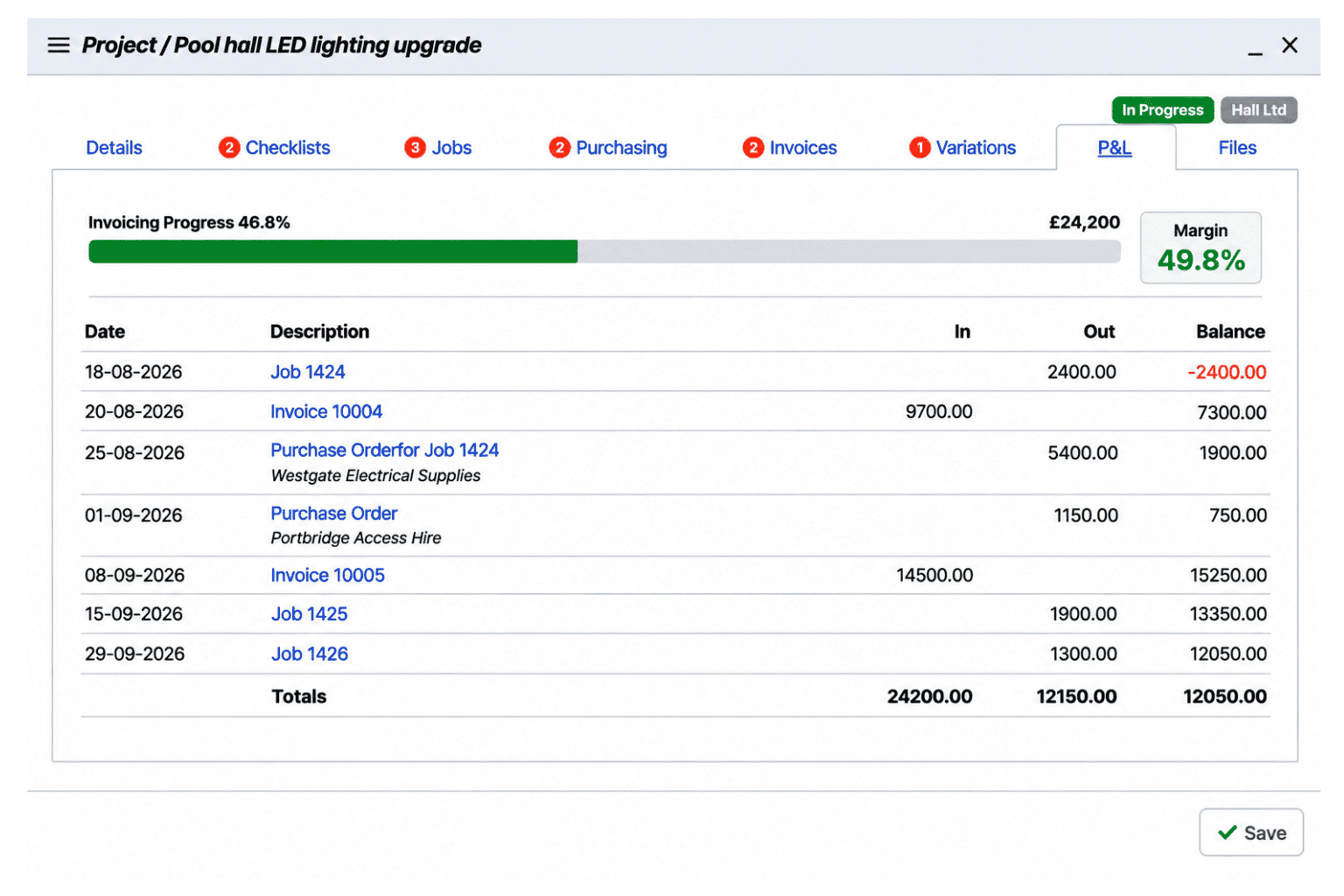
Throughout, TeamPoint's Project Profit & Loss view brings together recorded costs, invoiced revenue and margins. Managers can see how the project is performing financially and how much of its value has been invoiced, which helps when reviewing progress, agreeing further work and deciding what to invoice next.

TeamPoint Project Profit and Loss screen showing invoicing progress, project costs and profit margin
Project P&L

For a more detailed look at project management, including jobs, variations, purchasing and profitability, see Managing Projects with TeamPoint.

Managing retentions and money due in the future

For many contractors, issuing an invoice doesn't mean receiving the full payment straight away.

In construction and project-based work, customers commonly hold back a percentage of the contract value until certain conditions are met. Part may be released on completion, with the rest held until the end of a defects liability period, sometimes a year or more later.

Across several projects, these amounts can add up to a considerable sum, and keeping track of when each one falls due is an important part of managing cash flow.

Retention management is a relatively recent addition to TeamPoint, developed as we became more involved with the roofing industry and the particular financial arrangements its contractors have to manage. It's a good example of how TeamPoint continues to develop in response to the practical needs of the industries we work with.

Take a roofing contractor completing a £200,000 refurbishment with a 5% retention. Of the £10,000 withheld, £5,000 is due on practical completion and the remaining £5,000 twelve months later.

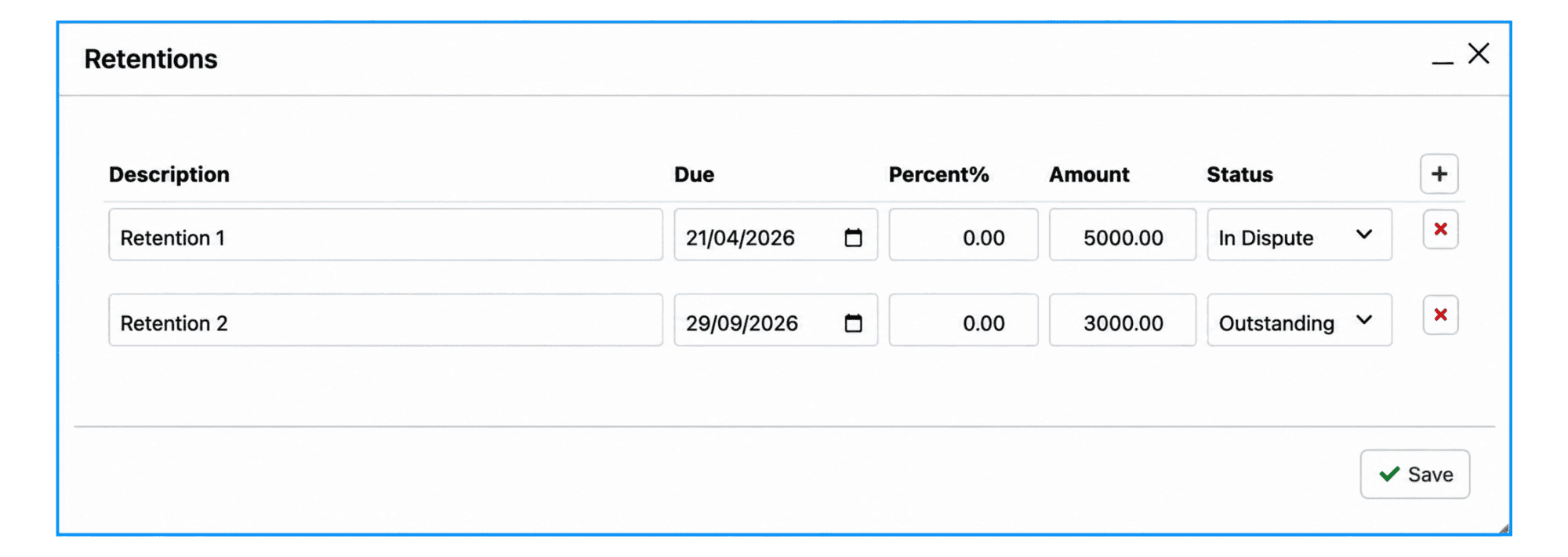
TeamPoint records both amounts as retention terms against the invoice, each with its own due date. The retained amounts are calculated and deducted from what's payable immediately, while remaining visible for future invoicing. Retentions work on individual job invoices as well as project invoices.

As due dates approach, the Finance Retentions dashboard shows what's coming up, what's overdue and what might need chasing. A twelve-month view shows expected retention payments over the coming year.

When a retention falls due, an invoice can be generated from its record. Any disputes can be recorded and managed too, rather than getting lost among old project paperwork.

For a business running several roofing or construction projects at once, that means a clear record of what has been retained and when it falls due, long after the original work has finished. Payment collection and reconciliation are then handled through the usual financial processes.

Retentions showing payment amounts and due dates
Retention tracking

Recurring invoicing for service and maintenance contracts

With ongoing service and maintenance agreements, how often the work happens doesn't always match how often the customer pays.

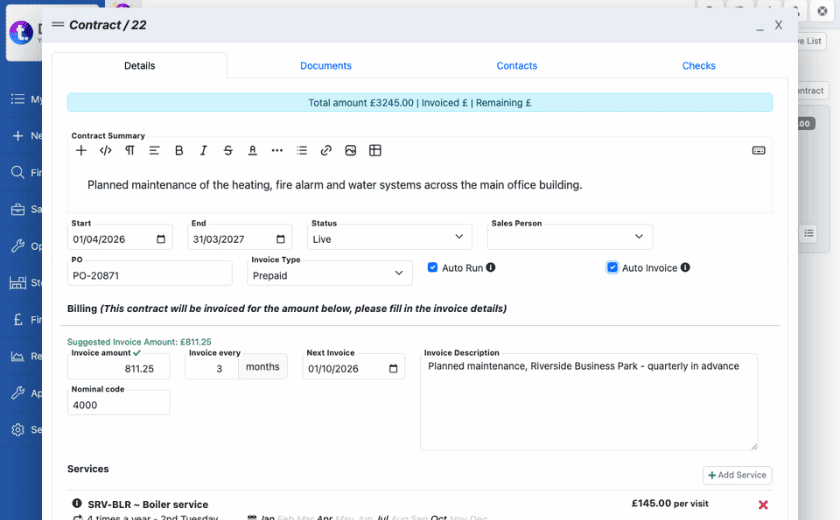
A customer might pay a fixed monthly amount for a contract that includes quarterly inspections and an annual service. TeamPoint manages the two schedules independently, generating the planned maintenance jobs when they're due and raising invoices according to the agreed billing arrangement.

TeamPoint service contract screen showing recurring invoicing, payment schedules and planned maintenance arrangements.
Recurring Invoicing

For prepaid service contracts, recurring invoices can be generated automatically, monthly, quarterly or annually, without anyone in the office having to remember when the next one is due. When engineers complete visits covered by the agreement, the work is recorded against the contract without generating an extra charge.

Where customers pay after each service instead, invoices are raised as individual visits are completed. And if a customer asks for work outside the agreement, it's managed as a separate chargeable job and invoiced in the usual way.

This lets contractors offer different types of service agreement while keeping both planned work and billing under control.

For further information on scheduling visits, maintaining contract records and managing renewals, see Service Contract Management in TeamPoint.

Sending invoices, taking payments and working with accounting software

Once an invoice has been raised, the next step is getting it to the customer and, of course, getting paid.

TeamPoint can email invoices directly to customers, print them or make them available through the Customer Portal. Delivery preferences are configured for individual customers, and the Finance Dashboard shows invoices waiting to be sent or exported to the accounting system.

The TeamPoint Customer Portal also allows customers to access invoices alongside their jobs, service records and supporting documents.

Making it easier for customers to pay

Giving customers a straightforward way to pay can help businesses collect money sooner.

TeamPoint supports online card payments through Stripe and SumUp. Where enabled, sales invoices and deposit invoices include an online payment link, allowing customers to pay securely through the payment provider.

This is particularly useful for deposits, as customers can make the payment without arranging a bank transfer or contacting the office.

Successful online payments are recorded automatically in TeamPoint. Payments received by other methods can be marked as paid manually.

Working alongside your accounting software

Most established contracting businesses already have an accounting system, often with years of records, established processes and an accountant who knows exactly how everything works. Introducing job management software shouldn't mean abandoning that.

TeamPoint integrates with Xero and QuickBooks, allowing customer and invoice information to be exported without entering it all again. Sage file exports are also supported.

The division of work is clear. TeamPoint manages the operational side of invoicing: the work carried out, charges, supporting documents and customer billing arrangements. The accounting package handles the ledger, bookkeeping and payment reconciliation.

What syncs and what doesn't

Under the standard workflow, invoice information flows one way, from TeamPoint into the accounting package. Payments recorded directly in Xero or QuickBooks don't automatically update the corresponding payment status in TeamPoint.

However, businesses using Xero can retrieve customer account balances, including overdue amounts, and show them against customer records. These balances are refreshed when the function is run, rather than synchronised continuously.

Payment reminders can also be configured where businesses require them.

During onboarding, we work with each customer to establish how TeamPoint should fit alongside their existing financial systems and what information needs to be shared. The aim is a reliable route from completed work to invoicing and payment, without duplicating the accounting work already done elsewhere.

Invoice disputes and credit notes

Even with careful checking, invoices are sometimes queried. A customer may disagree with a charge, question whether work was completed or ask for an adjustment.

Rather than letting the issue disappear into an email thread, TeamPoint lets the office record the dispute against the invoice, explain the problem and assign someone to investigate.

The invoice stays flagged until the matter is resolved, with a record of the decisions and actions taken along the way.

If an adjustment is agreed, a full or partial credit note can be raised and linked to the original invoice. Where the job itself needs correcting, TeamPoint provides a controlled process for reopening it and dealing with the associated invoices.

The original records and later changes remain traceable, so the office has a clear account of what happened if the customer asks again.


Purchasing and supplier invoices

Managing the money coming in is only part of the picture. There's also the money going out, and making sure what you pay suppliers matches what was ordered and what the work is actually costing.

Imagine a contractor running several projects at once, with materials arriving from different suppliers, equipment on hire and subcontractors invoicing for completed work. Without a clear system, purchase orders sit in email inboxes, supplier invoices land in the accounts department and project managers keep their own spreadsheets of what they've spent. Working out whether an invoice is correct, which job it belongs to and whether the project is within budget becomes a time-consuming exercise.

Purchasing and supplier invoices

In TeamPoint, purchase orders are linked directly to jobs and projects, giving a record of what was ordered, from whom and at what cost. When supplier invoices arrive, they can be matched to the relevant purchase orders, checked and authorised before being passed to the accounting system.

The accounts team can compare what they're being asked to pay with what was ordered, while project managers see purchasing costs alongside the work they're responsible for. Unexpected charges or rising costs are easier to investigate before they become a bigger problem, and everyone works from the same information when reviewing what each job or project is costing the business.

Financial visibility: what's been invoiced and what's still to come

An invoice that hasn't been raised can't be paid. Yet in a busy contracting business, completed work can easily be overlooked, even though the cost of delivering it has already been incurred.

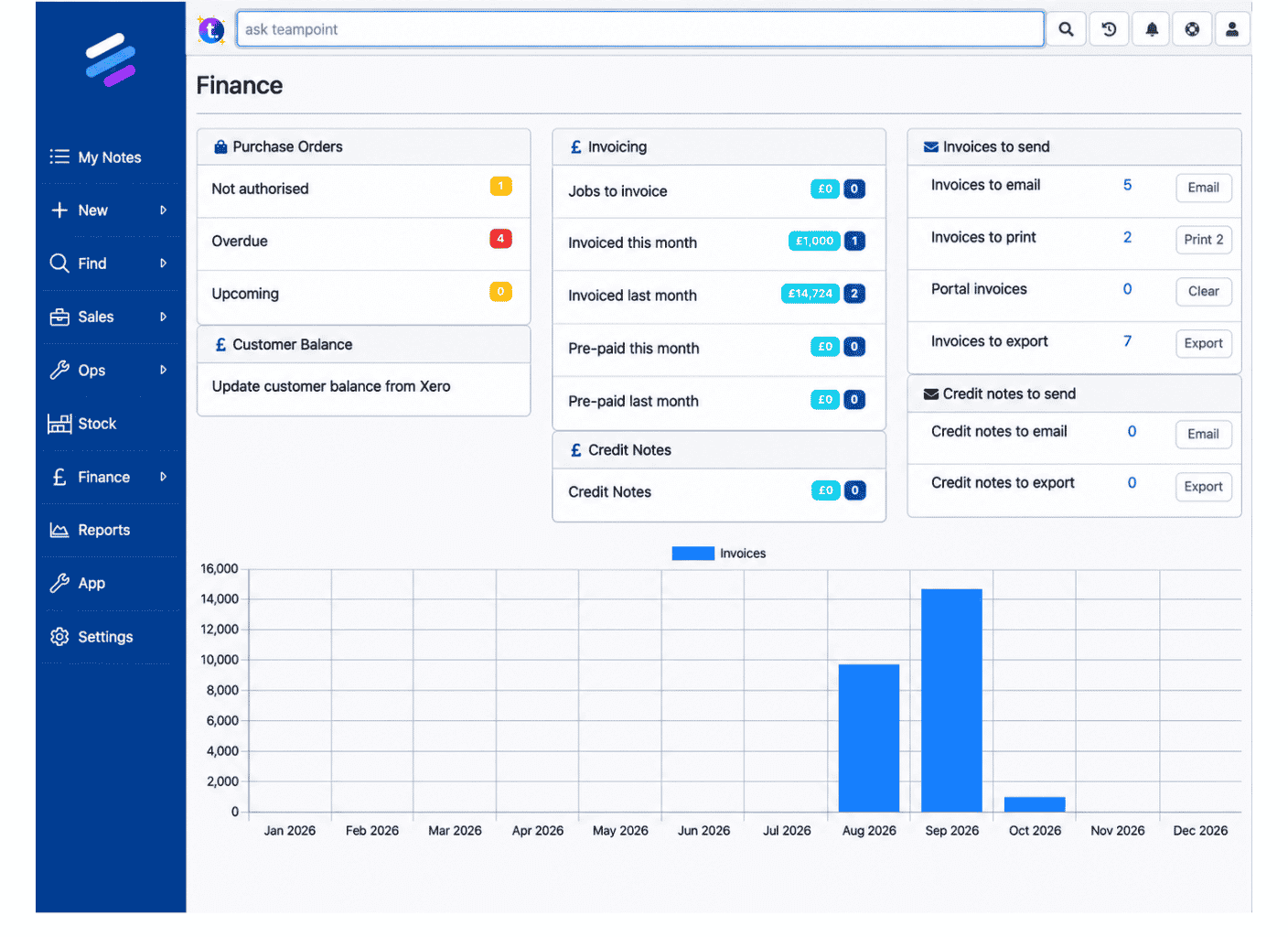
TeamPoint's Finance Dashboard shows managers where attention is needed: how many jobs are ready to invoice and their value, how much has been invoiced this month compared with last month, and which invoices are still waiting to be sent or exported.

A monthly chart shows invoicing activity across the year.

For longer-term work, the Project Profit & Loss view shows recorded costs, invoiced revenue, margins and progress against the agreed project value. The Finance Retentions panel tracks amounts coming due, with a twelve-month view, and customer account balances and overdue amounts can be retrieved from Xero.

TeamPoint Finance Dashboard showing invoicing totals, outstanding tasks, credit notes and monthly revenue.
Finance Dashboard

TeamPoint also retains invoice records and associated financial information, allowing the office to review previous invoices and investigate queries. For a wider picture, TeamPoint's business reporting tools help managers examine job costs, purchasing and operational performance.

Together, these views separate three different figures: work not yet billed, revenue already invoiced and payments expected in the future. Understanding the difference matters when planning expenditure, reviewing performance or deciding where the office should focus.

The value isn't in any single report or dashboard. It's being able to see what's happening across the business and act on it, without spending half the day gathering information.

It's a really good system from a finance point of view. We've certainly become a lot more efficient business.

Helen from Goslyn.Helen Thompson, Compliance OfficerGoslyn Environmental Systems

Invoicing & payments FAQs

Answers to some of the most common questions about how TeamPoint handles invoicing, payments, retentions and accounting integrations.

Help Desk

Still have questions?

Can't find the answer you're looking for? Our friendly UK-based support team is a message away and ready to help.

Talk To Us
Yes. Completed jobs can be reviewed, checked and moved to Ready to Invoice, where invoices can be created individually or through a batch invoicing run. Invoices can be previewed before a batch is processed.
Yes. TeamPoint's consolidated invoicing combines selected jobs for the same customer on one invoice, with the relevant job, site and purchase order details retained. The appropriate arrangement depends on the customer's billing and VAT requirements.
Yes. TeamPoint can prevent dispatch until a deposit has been paid, and can flag jobs with a missing purchase order number and hold them back until it has been entered.
Yes. Deposits can be requested against jobs as a fixed amount or percentage of the job value, and are taken into account on the final invoice. Stage invoices can be raised against projects according to the agreed payment schedule.
Yes. Retention terms can be applied to individual job invoices and project invoices, with separate tracking of amounts, due dates, overdue and disputed retentions. Retention invoices can be raised when the amounts fall due.
Yes. Prepaid service contracts can generate recurring invoices automatically, monthly, quarterly or annually. Other contracts can be invoiced after each completed service visit.
Yes. Where Stripe or SumUp is enabled, sales and deposit invoices include a payment link so customers can pay by card. Successful online payments are recorded automatically against the invoice in TeamPoint.
Yes. TeamPoint integrates with Xero and QuickBooks to export customer and invoice information, and also supports Sage file exports. Standard invoice exports are one-way, although customer balances can be retrieved from Xero.
Yes. Invoice disputes can be recorded, assigned and tracked through to resolution, and full or partial credit notes can be raised and linked to the original invoice.
Yes. Purchase orders can be linked to jobs and projects, and supplier invoices can be matched to them, checked and authorised before being passed to the accounting system.
Yes. TeamPoint supports customer-specific pricing, invoice layouts, billing arrangements, payment terms, delivery methods and supporting documents, with further configuration or development available where required.

What are your invoicing priorities?

However your business operates, efficient invoicing makes a real difference. Less time chasing information and correcting mistakes means more time for the work that matters. Getting invoices out accurately and on time helps protect cash flow, and keeping track of costs and payments gives you greater control over your finances.

We've covered a lot of ground, from straightforward job invoicing to the more complicated arrangements involved in projects, service contracts and multiple customers. The important point is that none of these processes needs to be managed separately from the work itself.

TeamPoint brings them together, helping you handle growing volumes of work, avoid missed charges and maintain reliable invoicing processes as your business develops.

No two businesses operate in quite the same way. That's why we take time during onboarding to understand how you work, what your customers expect and where your existing processes could be improved.

TeamPoint has extensive functionality already, and it can be configured and developed for more specialist requirements. Our aim isn't to change the way you run your business to suit our software. It's to give you the tools and support to run it more effectively.

Where does completed work get held up in your business before it's invoiced, and what would it be worth to fix that?

If you'd like to explore how TeamPoint could improve invoicing and financial management in your business, we'd be very happy to show you what's possible.

You may also like

Abstract geometric illustration representing the TeamPoint quotation process, using blue, navy, purple and yellow brand colours.
Platform Capabilities
Written byRosie Cottell

From Quote to Invoice: How TeamPoint Keeps the Commercial Process Connected.

This guide explains how TeamPoint manages the full quoting process, from the first enquiry or site survey through to pricing, approval, customer acceptance, job, Project or Service Contract creation, invoicing and reporting.

08.09.26
Read More
Abstract illustration representing TeamPoint mobile working, with connected routes, job updates and information flowing between operatives on site and the office.
Platform Capabilities
Written byRosie Cottell

Working on site with the TeamPoint mobile app

A practical look at how the TeamPoint mobile app supports engineers and operatives on site, from accessing job information and completing forms to capturing evidence, updating assets and flagging further work. It also shows how information recorded on site feeds back into the wider TeamPoint job record, giving managers better visibility, consistency and information for follow-up, compliance, reporting and invoicing.

20.09.26
Read More
Abstract map-based scheduling illustration showing connected routes, location points and planning paths in TeamPoint brand colours.
Platform Capabilities
Written byRosie Cottell

From Planning to Dispatch: Scheduling in TeamPoint

TeamPoint helps service businesses plan, allocate and adapt work using connected calendar, map and mobile scheduling tools. From planned maintenance and reactive jobs to skills, availability, travel time and reporting, scheduling stays connected to the wider job information so teams can make better decisions as the day changes.

11.09.26
Read More
Interconnected structures representing the different stages of a project, bringing people, resources, schedules and costs together.
Platform Capabilities
Written byRosie Cottell

From Quote to Completion: Managing Projects with TeamPoint

From planning and scheduling to purchasing, variations, invoicing and profitability, discover how TeamPoint helps contractors manage projects of every size. Keep track of people, work, costs and compliance, all in one connected system.

20.10.26
Read More