Abstract illustration representing TeamPoint mobile working, with connected routes, job updates and information flowing between operatives on site and the office.

Working on site with the TeamPoint mobile app

20.09.26inPlatform Capabilities
Written by
Portrait of a TeamPoint blog author for the Knowledge Centre.
Rosie Cottell
HOME/KNOWLEDGE CENTRE/working-on-site-with-the-teampoint-mobile-app
Platform Capabilities20.09.26

Working on site with the TeamPoint mobile app

A practical look at how the TeamPoint mobile app supports engineers and operatives on site, from accessing job information and completing forms to capturing evidence, updating assets and flagging further work. It also shows how information recorded on site feeds back into the wider TeamPoint job record, giving managers better visibility, consistency and information for follow-up, compliance, reporting and invoicing.

The TeamPoint mobile app gives engineers and operatives access to the jobs they have been assigned. It sends them the information they need to carry out that work on site. It is where they can view job details, record what happens, complete forms, add photos and other evidence, and update the job as the work progresses.

Working successfully with a mobile app means making sure the person carrying out the job has the right information before they arrive, can record what happens while they are on site, and can send that information back to the office without relying on paper, memory or a phone call later.

The basics are much the same in most businesses; the person attending the job needs to know where they are going, what they are there to do and what information has already been recorded. They also need a reliable way to update the job as work progresses and send an accurate record back to the office.

Beyond that, what matters can vary considerably between industries and individual businesses. A drainage engineer may need to review the previous attendance, record photographs and note any further work required. An HVAC contractor may need to complete RAMS, capture evidence of the work and obtain a customer signature. A building maintenance business may place more emphasis on updating asset records, recording materials used or requesting additional stock. The mobile app can support these different requirements within the workflow set up for that company.

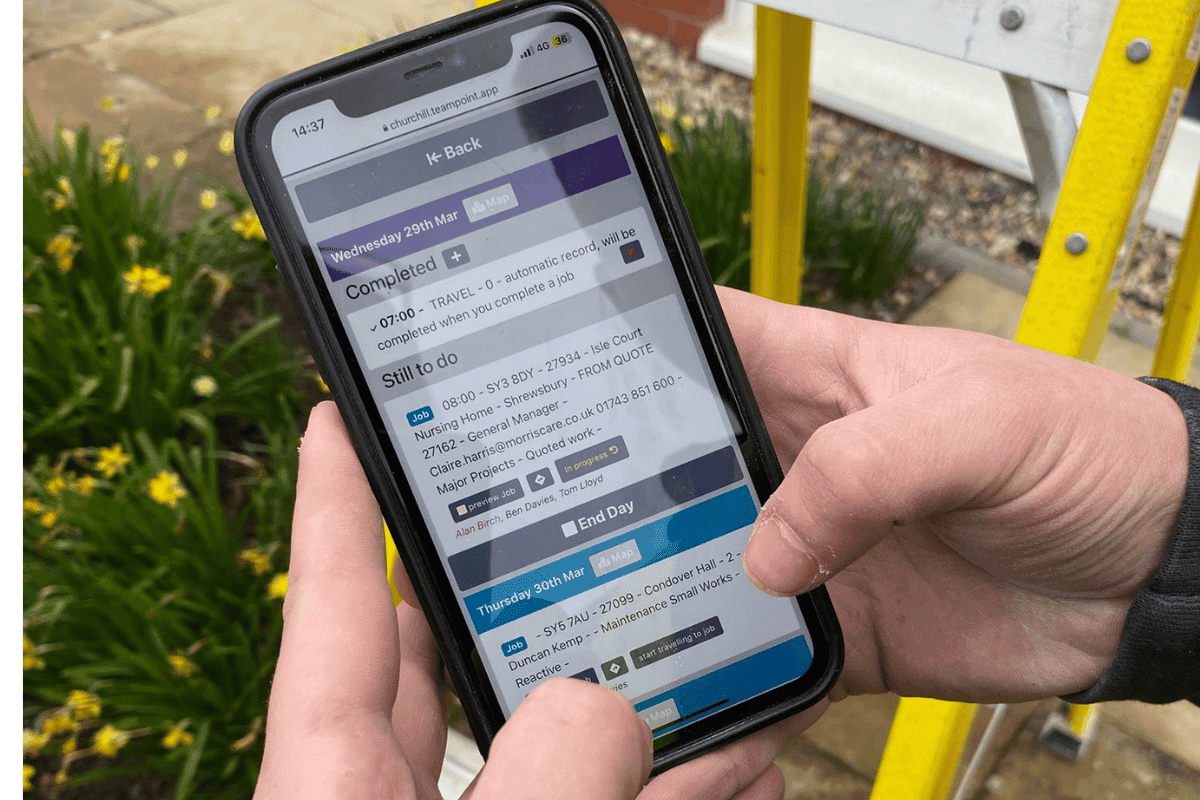
Once a job has been dispatched, the mobile app becomes the operative’s working view of that job. The information sent from the office is available on their phone or tablet, and as the visit progresses they can add notes, evidence, forms, materials, statuses and other updates required for that type of work. Much of this information is then available to the office as the job progresses, rather than only appearing after the visit is complete.

Engineer using the TeamPoint mobile app to view scheduled jobs, travel and daily work on site.
Mobile working

In TeamPoint the information recorded through the app also becomes part of the wider job record. It can feed into worksheets, job history, compliance records, invoicing and other parts of the working process, so the details captured on site can be used further down the line without having to be entered again.

TeamPoint is easy to access on any phone or tablet.

TeamPoint’s mobile app is accessed through the browser, so there is no separate app to download from the Apple App Store or Google Play. It can be used on phones and tablets, giving businesses flexibility over how they equip their operatives. Some TeamPoint customers provide dedicated work phones, while others prefer staff to use their own devices.

The mobile app is designed to be straightforward to use on site. Rather than giving an operative access to the full office system, what they can see and do is based on their TeamPoint permissions and the work they need to carry out. These permissions can be managed by the business and changed quickly when required.

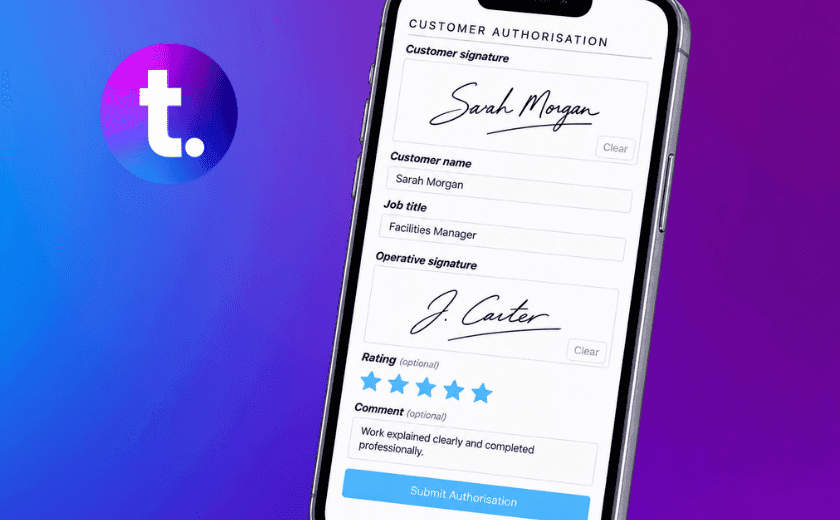
The app then guides the operative through the job. The information they need is presented as they work, with prompts for the details, checks or evidence that need to be completed at each stage. Depending on the workflow, that might include completing a form, answering required questions, taking photographs, recording materials or obtaining a signature. This helps make sure important information is captured while the operative is still on site rather than having to be remembered or chased afterwards.

One concern we often hear from new customers is whether their operatives will take to a new system, particularly where people have worked from paper worksheets, phone calls and handwritten notes for many years. Training and onboarding are important, but the app itself is intended to make the change manageable. In our experience, even people who describe themselves as not tech-savvy usually become comfortable with it quickly once they can see that it is saving them time and providing evidence that they have done their job thoroughly.

Many operatives carrying out service and reactive work for large organisations are already used to working this way. They may already use a customer's portal or app to complete forms, upload evidence and close down work before leaving site. For them, using TeamPoint is often less of a move to digital working and more about having their own company's jobs and information managed in the same way.

Once the app becomes part of the normal working day, several separate tasks start to come together. Job details are already available, forms and checks are in the same place, photographs and signatures remain with the job, and there is less need to carry paperwork or ring the office for information that has already been provided.

The app is also designed to cope with poor or intermittent signal. If an update cannot be sent straight away, TeamPoint keeps trying automatically at regular intervals until a connection is available and the information can be passed back to the office.

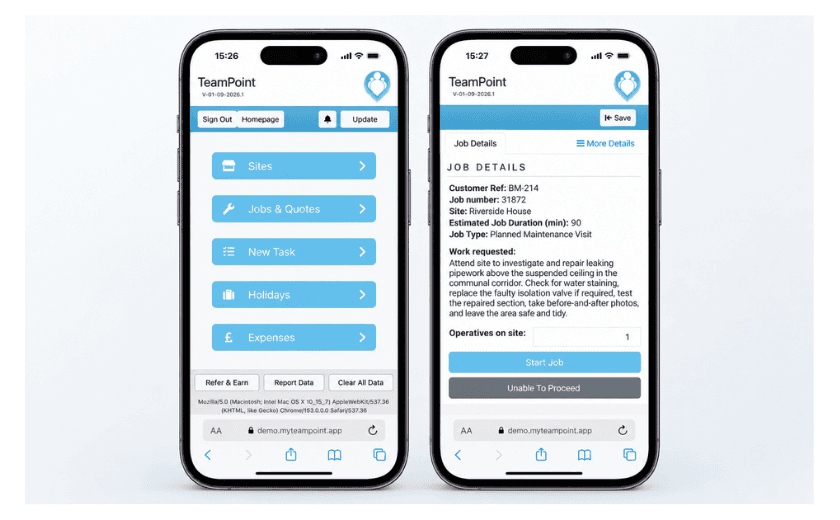
TeamPoint mobile app shown on two smartphones, with a mobile homepage and a building maintenance job screen, illustrating how engineers can access job information and manage work on site.
Job Details

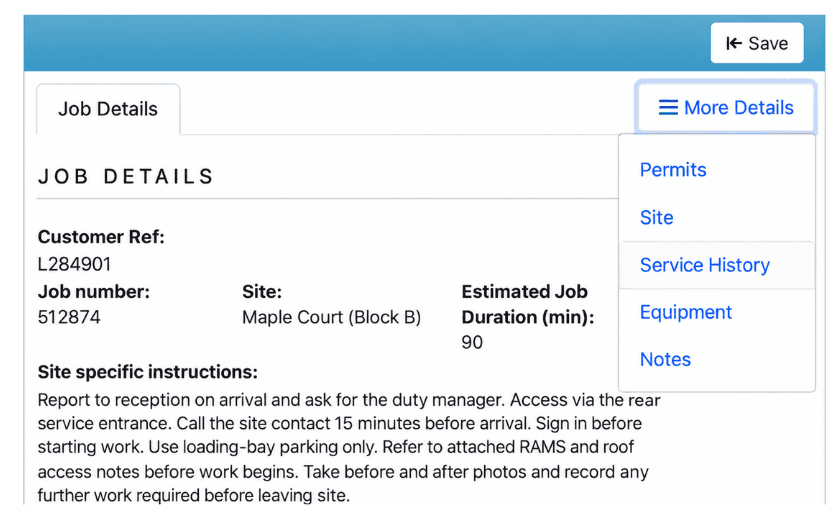
Once a job has been dispatched, the operative can open it and see the practical information they need for that particular visit. That can include customer and site details, the address, contact information, the work requested, access instructions, notes, documents and information about equipment or assets at the site.

For managers, the value is consistency. Customer-specific instructions can sit with the job rather than being passed on informally or held in somebody’s inbox. One site may only need a note about parking, while another may require the engineer to report to a duty manager, use a particular entrance or access code, sign into the customer’s own portal or follow a specific procedure before work begins.

Relevant RAMS, method statements, PDFs and other documents can be made available with the work as well. That gives the operative one place to refer back to what is required and reduces the risk of important information being missed, forgotten or chased up after they have already arrived on site.

TeamPoint mobile job details screen showing customer reference, job number, site, estimated duration, site-specific instructions and the More Details menu.
Job Details

Keep site knowledge with the job

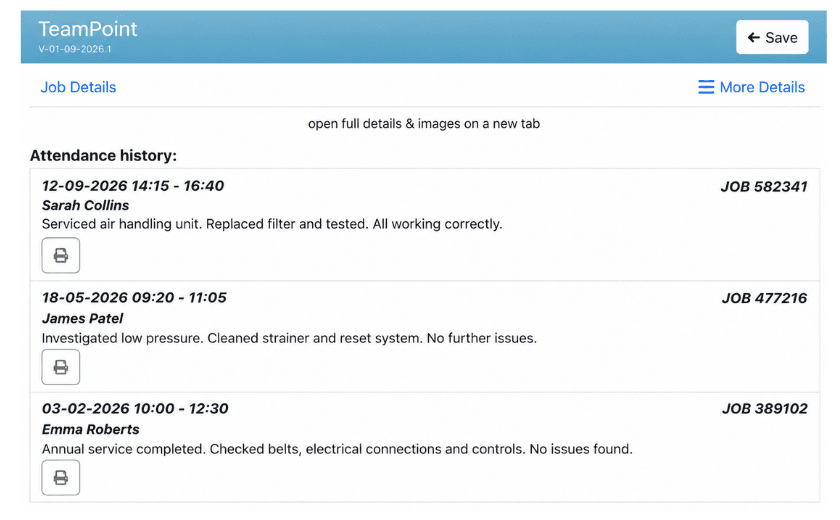
For businesses carrying out repeat maintenance, service contracts or reactive work, information from previous visits can be really useful. Where permissions allow, operatives can review earlier jobs and attendances, including notes, forms, photographs, statuses and who previously attended. That context can help the engineer arrive with a much clearer picture of the site and the work already carried out. If a fault has been investigated before, a part was replaced or a return visit was expected, they do not have to start from scratch.
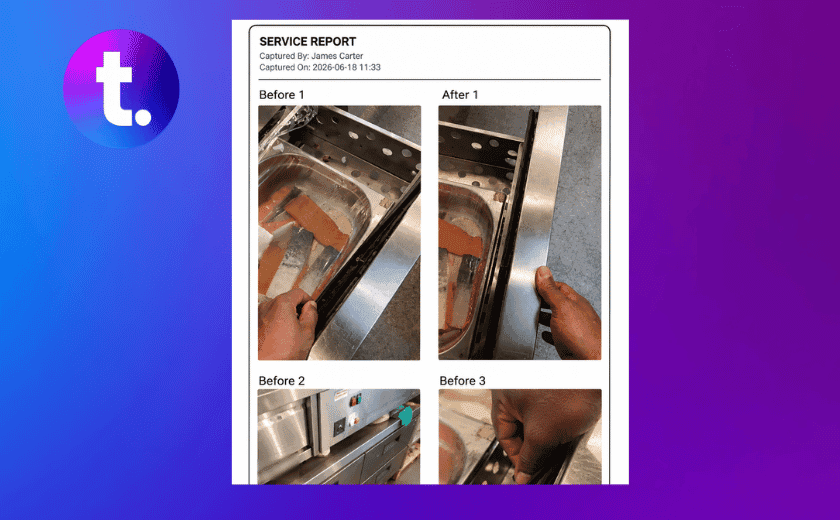
Clicking the print button opens the worksheet which show b4 & after photos, risk assessment, operatives report etc

It also means useful site knowledge is not dependent on one person remembering a conversation or knowing where to find an old worksheet. Practical notes such as where to park, which entrance to use or where a plant room is located can stay with the site record for future visits. Private notes can also be kept for the office where information should not be shown to the customer.

TeamPoint mobile attendance history screen showing previous site visits, engineer names, job numbers and summaries of work completed.
Visit History

You may also like

Abstract map-based scheduling illustration showing connected routes, location points and planning paths in TeamPoint brand colours.
Platform Capabilities
Written by
Portrait of a TeamPoint blog author for the Knowledge Centre.
Rosie Cottell

From Planning to Dispatch: Scheduling in TeamPoint

TeamPoint helps service businesses plan, allocate and adapt work using connected calendar, map and mobile scheduling tools. From planned maintenance and reactive jobs to skills, availability, travel time and reporting, scheduling stays connected to the wider job information so teams can make better decisions as the day changes.

11.09.26
Read More
Abstract geometric illustration representing the TeamPoint quotation process, using blue, navy, purple and yellow brand colours.
Platform Capabilities
Written by
Portrait of a TeamPoint blog author for the Knowledge Centre.
Rosie Cottell

From Quote to Invoice: How TeamPoint Keeps the Commercial Process Connected.

This guide explains how TeamPoint manages the full quoting process, from the first enquiry or site survey through to pricing, approval, customer acceptance, job, Project or Service Contract creation, invoicing and reporting.

08.09.26
Read More
Close-up of loft insulation rolls beneath exposed timber framing and brickwork during a UK home retrofit.
Industry Knowledge
Written by
Portrait of a TeamPoint blog author for the Knowledge Centre.
Rosie Cottell

What software does a UK retrofit contractor need to manage projects and be audit ready?

A practical guide to the software UK retrofit contractors need to manage complex projects, connect specialist systems, reduce admin and keep project information clear, complete and ready for reporting or audit.

02.09.26
Read More
Commercial Cleaning Management Software UK: What Growing Cleaning Businesses Need in 2026
Industry Knowledge
Written by
Portrait of a TeamPoint blog author for the Knowledge Centre.
Rosie Cottell

Commercial Cleaning Management Software UK: What Growing Cleaning Businesses Need in 2026

If you manage a growing commercial cleaning business, this guide will help you work out which software you really need, where specialist systems fit and how to keep the wider operation under control as you take on larger contracts.

24.08.26
Read More