:quality(68))
Managing Scheduling and Resource planning in TeamPoint
Scheduling & Planning
Schedule the Right People, at the Right Time, with Complete Visibility
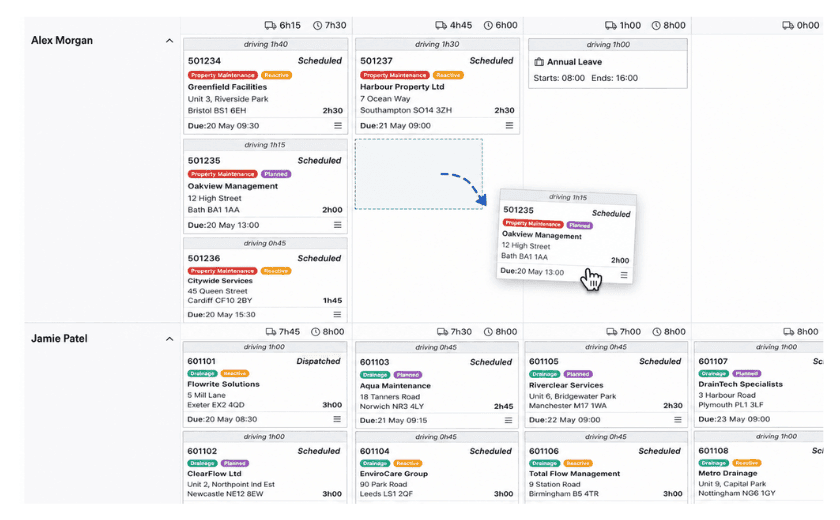
TeamPoint helps you plan work efficiently using calendar, map and drag-and-drop scheduling tools. Allocate the right engineers, surveyors, subcontractors and office staff, respond quickly to changing priorities and keep every job moving. Whether you're managing reactive call-outs, planned maintenance, service contracts or complex projects, TeamPoint gives your office complete visibility of your workforce and workload in one connected platform.
Why Use TeamPoint for Scheduling & Resource Planning?
Plan Work Faster- Allocate work in seconds using intuitive drag-and-drop scheduling tools that reduce administration and save valuable office time.
Maximise Productivity-Ensure the right person, with the right skills and availability, is assigned to every job.
Respond Quickly to Change-Reschedule work, move appointments and react to emergency call-outs without disrupting the rest of your schedule.
Reduce Travel Time-Use map-based scheduling to group nearby jobs together and reduce unnecessary journeys.
Improve Communication-Engineers and office staff always work from the latest schedule, helping eliminate confusion and unnecessary phone calls.
Gain Complete Visibility-See your entire workforce, workloads and job progress at a glance, allowing you to make informed scheduling decisions throughout the day.
Key Features
Calendar Scheduling- Plan work using an easy-to-use calendar with drag-and-drop functionality.
Map Scheduling- View jobs geographically to improve route planning and reduce travel time.
Drag & Drop Planning- Move appointments quickly between engineers, dates and times as priorities change.
Resource Allocation- Assign engineers, surveyors, subcontractors and office staff to the right work.
Availability Management- View workloads and availability across your entire team before allocating work.
Emergency Job Scheduling- Respond quickly to urgent call-outs without disrupting planned work.
Project Scheduling- Manage multi-stage projects with multiple visits and different team members.
Service Contract Planning- Automatically schedule recurring maintenance visits throughout the year.
Real-Time Updates- Receive live progress updates from engineers using the TeamPoint mobile app.
Complete Workforce Visibility- Monitor schedules, workloads and job progress from one central location.

Industries Using Scheduling & Resource Planning
TeamPoint's scheduling tools support organisations across a wide range of industries, including:
Every business benefits from the same powerful scheduling engine, with workflows and planning tools adapted by TeamPoint to fit the way you work.

Related articles
From planning to completion: how TeamPoint connects scheduling across the whole operation.
What is Job Management Software? The Complete Guide for UK Field Service Businesses.
Has Your Service Business Outgrown the Way It Operates?
How to Grow Your Service Business Without Losing Control.
Is it Time to Change your Job Management Software?
A Practical Guide to Modernising your Service business.
How to manage Muliti-site Roofing Contracts.
Managing Solar PV Installations UK 2026: Software, Workflows & Compliance.
Grease Trap Servicing: What to Look for in a Field Service Management Platform
How FM Businesses Balance PPM & Reactive Maintenance & Make Better Use of Engineer Time
Commercial Cleaning Management Software UK: What Growing Cleaning Businesses Need in 2026




Frequently Asked Questions
Find answers to some of the most common questions about TeamPoint's Scheduling & Resource Planning software. Whether you're managing reactive work, planned maintenance, projects or service contracts, these FAQs explain how TeamPoint helps you allocate resources efficiently, respond quickly to change and keep every job on track.
Still have questions?
Can't find the answer you're looking for? Our friendly UK-based support team is a message away and ready to help.
Talk To Us