:quality(68))
Managing Compliance in TeamPoint
ComplianceManagement
Stay compliant, reduce administration and keep every document, inspection and certificate connected to your customers, jobs and projects.
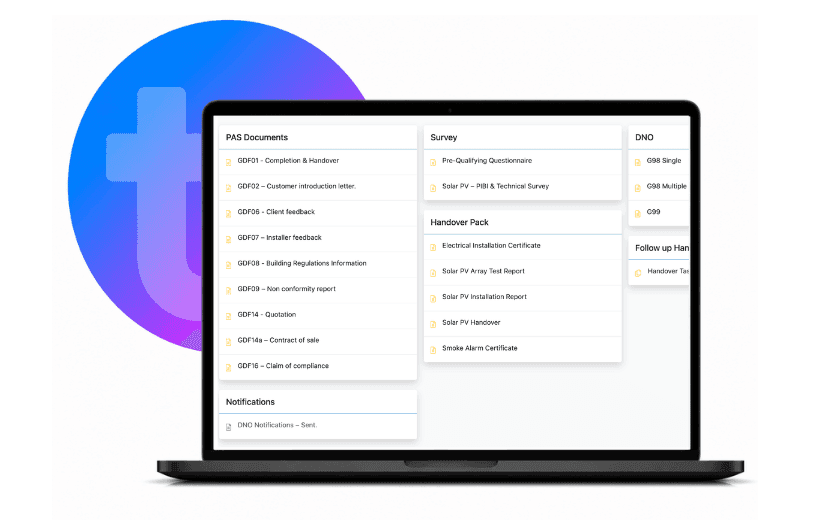
Keep compliance documents, certificates, risk assessments, site evidence and audit trails organised in one secure place. TeamPoint helps field service businesses manage compliance alongside their day-to-day operations. Store important documents, complete digital forms, capture site evidence, monitor certificate expiry dates and maintain a complete audit trail from quotation through to project completion. Whether you're managing health and safety documentation, customer compliance requirements, planned inspections or industry-specific regulations, TeamPoint keeps everything connected to the job, customer and project.
Why Use TeamPoint for Compliance Management?
Keep Everything Connected – Store compliance documents, certificates, photographs, digital forms and site records against the correct customer, job or project.
Reduce Administration – Replace paper forms with digital records and automatically pre-populate documents with existing job, customer and site information, reducing duplicate data entry.
Maintain Complete Audit Trails – Capture every document, signature, photograph and update throughout the lifetime of each job.
Never Miss Important Dates – Monitor certificate expiry dates, inspections and compliance deadlines from one central system.
Improve Site Visibility – Capture photographs, notes and supporting evidence directly from site using the TeamPoint mobile app.
Demonstrate Compliance with Confidence – Produce accurate records quickly for customers, auditors, insurers and regulatory bodies whenever they're required.

Key Features
Digital Risk Assessments- Complete and store RAMS, risk assessments and site-specific documentation electronically.
Certificates & Documentation- Store warranties, installation certificates, compliance documents and customer records securely.
Photo & Site Evidence- Capture photographs before, during and after work to create a complete visual record.
Digital Forms- Create bespoke digital forms tailored to your business processes and compliance requirements.
Electronic Signatures- Collect engineer and customer signatures directly from site.
Audit Trails- Maintain a complete history of every document, update and action taken throughout each job.
Expiry Date Monitoring- Track certificates, inspections and important compliance dates to reduce risk.
Mobile Compliance Recording- Engineers can complete forms, upload evidence and record compliance directly from smartphones or tablets.
Project Compliance- Keep compliance records connected across multi-stage projects, service contracts and planned maintenance.
Secure Document Storage- Store all compliance information securely within the TeamPoint platform for easy retrieval whenever required.
Industries Using Compliance Management
TeamPoint's compliance tools support organisations across a wide range of industries, including:
Every business faces different compliance requirements. TeamPoint adapts to your processes, helping you maintain accurate records while supporting industry best practice.

Relevant Articles:
Managing Compliance with TeamPoint: Checks, Evidence & Audit Trails
What is Job Management Software? The Complete Guide for UK Field Service Businesses.
Has Your Service Business Outgrown the Way It Operates?
How to Grow Your Service Business Without Losing Control.
Is it Time to Change your Job Management Software?
A Practical Guide to Modernising your Service business.
How to Manage Multi-Site Roofing Contracts.
Managing Solar PV Installations UK 2026: Software, Workflows & Compliance.
What software does a UK retrofit contractor need to manage projects and be audit ready?




Frequently Asked Questions:
Find answers to some of the most common questions about TeamPoint's Compliance Management software. Whether you're managing health and safety documentation, customer compliance requirements, digital forms or project records, these FAQs explain how TeamPoint helps you maintain complete visibility and accurate audit trails.
Still have questions?
Can't find the answer you're looking for? Our friendly UK-based support team is a message away and ready to help.
Talk To Us