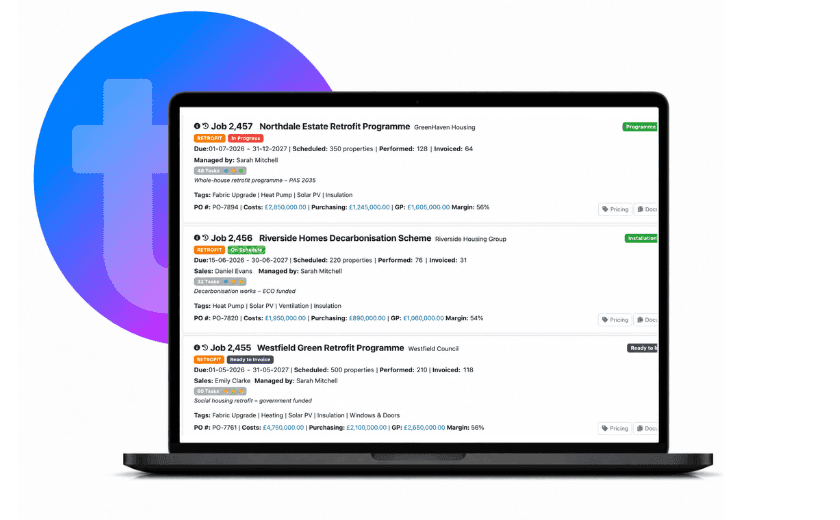
PAS 2035, the UK standard governing the whole-house retrofit process, makes that continuity particularly important because to meet PAS 2035 criteria the project record has to show how the retrofit developed as a whole, from assessment and design through installation and handover.
Being able to find that information quickly is essential, but it is not the same thing as being audit ready.
Audit readiness depends on the underlying record being complete, current and capable of demonstrating that the required process was followed. TrustMark’s Data Warehouse provides the structured retrofit-data and lodgement framework used for ECO4, including specific lodgement guidance and routes for responding to non-compliance following audit.
The job management system helps by keeping that record complete and up to date. Missing information can be flagged early, documents and decisions remain connected to the correct property, and the information needed for a submission or audit can be drawn from an organised record rather than assembled afterwards.
For a manager, that is the useful distinction: audit readiness comes from building a complete, reliable project record as the work happens, then being able to turn that record into the evidence an audit requires.
Which specialist retrofit software might you need- and what does each do?
A retrofit business will usually need more than one piece of software because some parts of the process are highly specialised.
A Retrofit Coordinator, for example, may need software built specifically around PAS 2035: assessment data, Improvement Option Evaluations, Medium Term Plans, design reviews, compliance checks, handover documentation and TrustMark lodgement.
PAS Hub sits firmly in this part of the software stack. It manages PAS 2035 workflow from assessment through to installation, supports collaboration between the parties involved and can lodge directly with the TrustMark Data Warehouse.
PASDOC offers another specialist route, with tools around PAS 2035 assessment, Improvement Option Evaluations, Medium Term Plans, design, compliance checking and TrustMark lodgement. Its guidance also makes an important wider point: lodgement problems often begin much earlier, when documentation and non-conformities have not been managed as the work progresses.
Depending on the measures your business delivers, there may be other specialist systems too. Energy assessment and modelling software may sit behind the retrofit design. Solar teams may use separate platforms for system design, yield calculations, MCS requirements and DNO applications.
Funding bodies and principal contractors may require their own portals, while finance will usually continue to sit in dedicated accounting software.
Using several different systems is not a problem- the problem is the administrative drag created when the same property starts to exist in five or six places at once.
A design may be approved in one application, a certificate produced in another, a funding status updated elsewhere and the operational team still working from a separate job record. Information then starts to be copied, re-entered, checked and chased across the business.
How can you keep the whole retrofit project moving forward as one?
On a large retrofit programme, the gaps and errors happen when a decision made in one part of the process needs to change what happens somewhere else.
Across tens or hundreds of properties, those handovers become expensive if they depend on somebody spotting an update in one system and manually recreating it in another. An approved design may affect scheduling and purchasing. A missing document may need to hold a job back. An inspection failure may create remedial work. A commercial milestone may determine whether a claim or invoice can be raised.
The aim should be to carry those decisions through the wider workflow with as little manual intervention as possible.
Where systems can exchange information, an approval can release the next stage automatically. A revised specification can become the current version used by the operational team. Missing evidence can hold a job at the correct point, while an inspection failure can trigger and track the remedial work that follows.
Specialist files should be stored on the project, job, site or customer level where they are needed and easily accessible to everyone who needs to see them or to share with customers in the customer portal.
At scale, that changes the management task considerably. Instead of working through properties one by one to find out what is wrong, managers can concentrate on the exceptions: work that has stalled, approvals taking too long, evidence still outstanding, remedials left open, or jobs that have reached a commercial stage and are ready to invoice or claim.
The result is less duplicate input, less errors, fewer manual handovers and less dependence on individuals remembering what needs to happen next. For a wider look at how TeamPoint keeps customer and site history, communication, evidence and ongoing service together around the work, read From First Enquiry to Ongoing Service: Managing Customer Relationships in TeamPoint.