:quality(68))
Mobile Working with TeamPoint
MobileWorking
Give Your Field Teams Everything They Need to Complete Jobs Anywhere
TeamPoint's Mobile Working software gives your engineers, surveyors and field teams everything they need to manage work from anywhere. Access job information, complete digital worksheets, capture photographs, collect signatures and update job progress in real time using the TeamPoint mobile app. Whether you're carrying out reactive repairs, planned maintenance, inspections or larger projects, TeamPoint keeps your office and field teams connected, helping work progress faster while reducing paperwork and administration.
Keep Your Team Connected
Work Anywhere- Give engineers and field teams secure access to job information wherever they're working.
Reduce Paperwork- Replace paper job sheets and handwritten notes with fully digital workflows.
Keep the Office Updated- Receive live updates, completed forms, photographs and notes as work progresses.
Capture Complete Job Evidence- Record photographs, videos, signatures and site notes directly against every job.
Improve Customer Service- Provide your workforce with customer history, site information and documents before they arrive.
Increase Productivity- Reduce administration, eliminate duplicate data entry and allow engineers to complete more work each day.
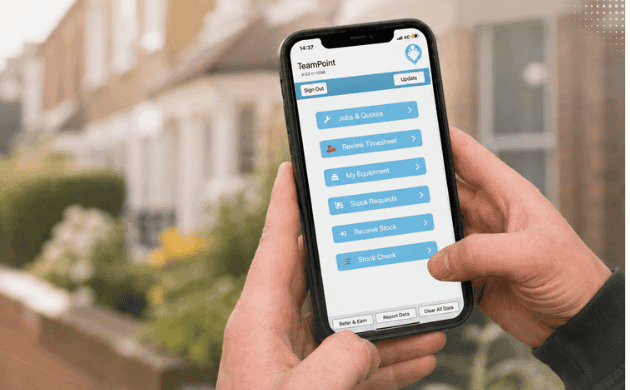
Key Features
Digital Job Sheets- Complete electronic worksheets and job records from a phone or tablet.
Customer & Site Information- Access customer details, site history, notes and previous work before arriving on site.
Photo & Video Capture- Capture unlimited photographs and videos as evidence of work completed.
Electronic Signatures- Collect customer signatures directly within the mobile app.
Forms & Checklists- Complete inspections, surveys, compliance forms and custom digital documents.
Offline Working- Continue working even without a mobile signal, with information synchronised automatically when a connection becomes available.
Real-Time Updates- Keep the office informed with live job progress, notes and status updates.
Time Recording- Record attendance, travel time and working hours directly from site.
Document Access- View RAMS, manuals, drawings, certificates and supporting documents while working.
Messaging & Notifications- Receive job updates and communicate with the office using TeamPoint's built-in messaging system.
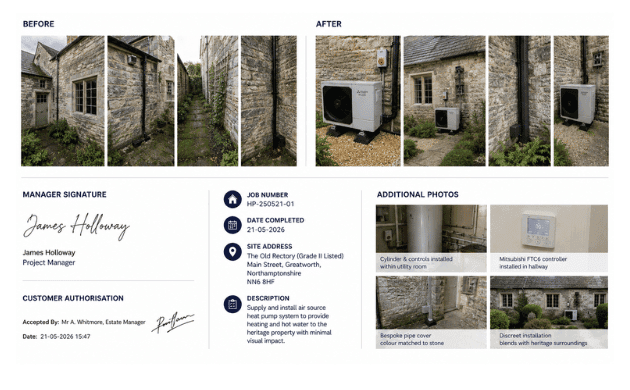
Industries Using TeamPoint Mobile workers App.
TeamPoint's Mobile Working software supports organisations across a wide range of industries, including:
Every business benefits from the same powerful mobile platform, with forms, workflows and job information adapted by TeamPoint to fit the way your teams work.

Related Articles:
What is Job Management Software? The Complete Guide for UK Field Service Businesses.
Has Your Service Business Outgrown the Way It Operates?
How to Grow Your Service Business Without Losing Control.
Is it Time to Change your Job Management Software?
A Practical Guide to Modernising your Service business.
Managing Solar PV Installations UK 2026: Software, Workflows & Compliance.
How FM Businesses Balance PPM & Reactive Maintenance & Make Better Use of Engineer Time
Commercial Cleaning Management Software UK: What Growing Cleaning Businesses Need in 2026
From planning to completion: how TeamPoint connects scheduling across the whole operation




Frequently asked Questions
Find answers to some of the most common questions about TeamPoint's Mobile Working software. Whether your teams are carrying out reactive repairs, planned maintenance, inspections or project work, these FAQs explain how TeamPoint helps your workforce stay connected, capture information from site and reduce paperwork.
Still have questions?
Can't find the answer you're looking for? Our friendly UK-based support team is a message away and ready to help.
Talk To Us