:quality(68))
MANAGING ASSETS & EQUIPMENT IN TEAMPOINT
ASSET & EQUIPMENTManagement
Keep equipment, servicing and site records connected
Keep customer assets, equipment and vehicles linked to the sites, jobs and projects they support. TeamPoint helps you maintain service history, certificates, important dates and supporting records in one place, giving the office and site teams a clearer picture of what is being maintained and what needs attention next.
BRING ASSET AND EQUIPMENT INFORMATION INTO ONE PLACE
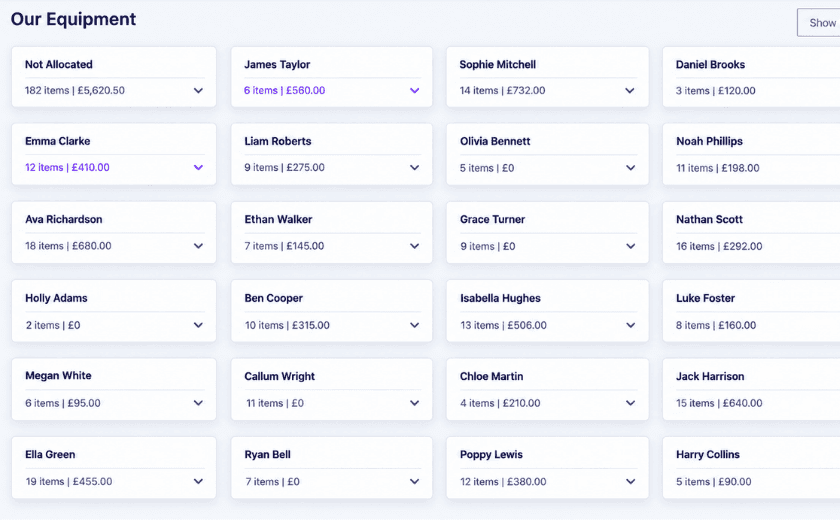
TeamPoint helps you keep track of the equipment your business owns, who has it, what it is worth and when it needs attention. Tools, plant, trailers and other company assets can be allocated to operatives or left unallocated until they are issued.
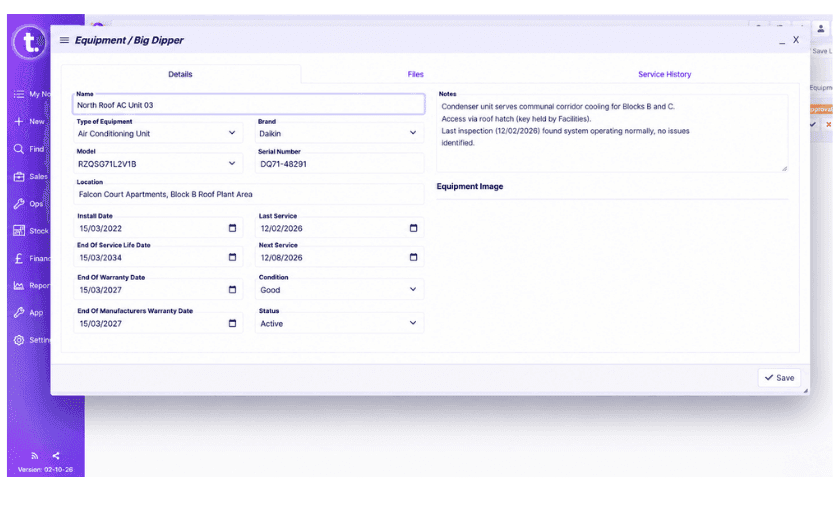
Each item can hold useful information including purchase date, service history, next service date, condition, location and cost, with images and files such as user manuals attached where needed.
Service warnings make overdue equipment easy to spot, while operatives can see the equipment assigned to them in the mobile app. That gives both the office and the person using the equipment a clearer record of what they are responsible for.
Key Features
Equipment Records - Keep details of tools, plant, machinery and other company equipment together in one place.
Equipment Allocation - See which member of the team has each item and what is currently unallocated.
Values & Costs - Record the value of equipment so you have a clearer picture of what is held across the business.
Service & Maintenance Dates - Keep servicing and maintenance information attached to the equipment record.
Inspection Reminders - Track important dates so inspections, servicing and other checks are less likely to be missed.
Documents & Certificates - Store supporting documents, certificates and other relevant files against the equipment.
Equipment History - Keep a record of previous allocations, servicing and other activity linked to each item.
Vehicle Management - Record vehicle information including MOT and service due dates alongside the rest of your operational assets.
Mobile Access - Give your team access to the equipment information they need while they are working away from the office.
Connected Records - Keep equipment information within the same system as jobs, project, sites, customers, stock and wider operational records.
INDUSTRIES USING ASSET & EQUIPMENT MANAGEMENT
TeamPoint helps businesses across a range of service industries keep track of equipment, assets and important service information, including:
Whether you are tracking company equipment, tools and plant or assets installed at customer sites, TeamPoint keeps the information connected to the wider work your team is managing.

Related articles:
How TeamPoint Helps Manage Projects
Managing Compliance with TeamPoint: Checks, Evidence & Audit Trails




Asset & Equipment Management FAQs
Questions about how TeamPoint helps you record, track and maintain company equipment and customer assets.
Still have questions?
Can't find the answer you're looking for? Our friendly UK-based support team is a message away and ready to help.
Talk To Us